Most of what I post here is professional and digitally minded, but today's post is lighthearted and fun. My two favourites from this year's parodies.
I Like Big Buses

Most of what I post here is professional and digitally minded, but today's post is lighthearted and fun. My two favourites from this year's parodies.
I Like Big Buses
The video above is still their favourite, though! We had a table filling up pinecones, flowers, weird seedpods and photos of vegetables and fruit from home after watching it.
If you're looking for a way to capture your students' attention (particularly your bright little buttons!) and get them wanting to explore the maths they're learning in class more deeply, or in ways they can see and touch in the world around them, Vi Hart is a phenomenal hook, line and sinker. You can also check out Vi's website here and follow Vi's Twitter feed here.
I'll do a post on our platform - EduPLEX by OzInterbiz - another time, but today I want to share a Web 2.0/3.0 tool I was encouraged to become familiar with by our outsource instructor, George Sorgi. We had a lot of instructional videos at our fingertips to embed into our portfolio artifact pages, but not one for a graphic manipulation tool we wanted to use, so George suggested I make one. I had seen my Virtual Teacher instructors on Coursera use software where they could play their presentation and talk to it, recording it for us to stream later, and they had briefly mentioned that it would be useful for us to learn to use said software, but they'd never gone into much detail about what to use, or how to go about making a good video.
Screencast-o-matic has a free online version of its software that you can use for just such a purpose! Prepare your presentation by whatever method you like, then load up Screencast-o-matic, and talk to it while you record - voila! Well, not quite voila - it took me nearly two hours to make my first, very short video. Since then, I've become a bit more streamlined in how I go about making videos - I make a running sheet of what I need to cover (usually in point form on the back of an envelope!), practice once and then record. I try to make sure I'm ready to record it in the evening, as the mic picks up background sound very easily (as you'll hear in my example below!).
Feedback I've had from my students has been positive! It took a few of them a little bit before they paused it, took off their headphones and, looking at me with big eyes, asked "Ang, is that YOU??" as they are used to hearing George or one of the other instructors on the videos. It's been a great tool for testing whether they can extrapolate instructions about one task and apply it to another, too, as the examples in the videos are showing how to use functions on the tools, not complete the artifacts themselves.
This was my first Screencast-o-matic video, explaining how to create a graphic using SketchPad. Enjoy!
It's called Classroom Blog Repository and it's pretty awesome.
Some, only scratching the surface of the site, may look at it and say it's just a collection of links to classroom blogs - but it is SO much more than that. It is a platform from which teachers can draw inspiration, view best blogging practice in action, connect with like-minded educators, and connect their classes with like-minded students. It is an opportunity to showcase student work and receive feedback from others around the world, and an opportunity for students to learn about giving useful, academic feedback, and engage in cyber-savvy discussion about how to improve their own work.
There's no cost involved, and every blog is manually entered by the creators, who touch base with you afterwards to make sure you know your blog entry has gone live. Submitting your class blog URL, in my mind, is the ideal next-step for an educator who has got the hang of posting meaningful, relevant content - and now wants to broaden their audience.
Some interesting notes - while some educators still use Blogger/Blogspot (like I do), many are using Global2 (attached to vic.edu.au). Many choose to include photos of students, featuring identifying data (school logo, etc.), which I don't. Many have students contributing but not moderating (also my practice). The entries act as an excellent tool to encourage reflection!
Click through and have a look sometime!
Dr Tim Kitchen presented about flipped learning and how Adobe software can help with both teacher-based presentations and student-centered tasks. A few of the programs we use at school already - Adobe Voice, for example, which has been installed on the Macs in the Media Studio and in the Senior Lab. Some were new, though, and we are already using one to great effect in the classroom!
I recently surveyed the parents in our class about what they would like to see more of on the blog, and the top answer was 'Photos!' I've used Flickr feeds in the past, but as this is not accessible from student laptops and the lab desktops, I was searching for a quick, free, drag-and-drop app or program or Web 2.0 tool that we could all use easily to make a weekly presentation of what we've been doing. Enter Adobe Slate!
We've been using it on my iPad, as my class already take photos of their work in literacy and there are always a few photos there to begin with. It's encouraging me to take HEAPS more photos of my class, too, so there are plenty to choose from each week. You can enter text, set photos as a grid or by themselves as part of a 'glideshow', embed links, and heaps more. Here is my first attempt:
You do need an Adobe Education Exchange ID to operate it, but it's free to sign up, and they host the final product for you so it is easy to embed and share. More about Adobe Education Exchange in a future post!
Take a photo, draw a mouth, record your message, add accessories, share it. Sounds like a frivolous, purely-for-entertainment app on the surface, right? But the implementations for flipped learning with younger readers are awesome. Using characters from school-wide curricula, such as the You Can Do It program, or the Kimochis, or school-specific mascots, can help you create presentations for students to watch from home in preparation for workshops or lessons the next day.
Follow-up to this is a brainstorm session (collaborative creation of a KWL chart using the stickynotes widget and the touchscreen) used as a pre-assessment of students' intrapersonal learning.
Improve is accessible to teachers working for most states and territories using your Scootle username and password. Teachers can set up tests from a question bank, added to and edited by teachers from around the country. You can share your tests with your colleagues if you have their email address, so that if like us you are comparing cohort results you have a common platform from which to do so. The report on results from each test (pre and post) is presented as a graph so you can easily see the average from each test, the improvement each student has made, etc.
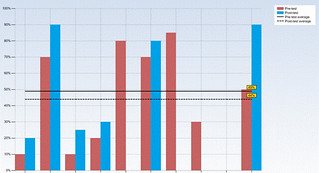
Students sit the pre-test using a password and test PIN, answering the questions and also rating how confident they are about the answer they've given. They then have activities assigned to them based on their results, then take the post test after they've finished them. The activities are pulled from a number of different websites, including the NLVM, and the students love them (especially the jigsaw ones where they have to solve problems to remove pieces of a puzzle to reveal a picture!).
A few small flaws, one of which I have given feedback about already - if a child accidentally presses 'take the test again' (to take the post-test) after finishing the activities and then clicks back, they get zero, and there's no way to just re-set the test for them without erasing the class' data and completed activities and re-setting the whole unit for everyone. In this day and age, with differentiated learning as highly-thought-after as it is, I don't think you can afford not to have this function built in.
It's a good add-on to other online assessment methods, and we'll continue to use it while we are streaming our classes. Another great benefit to having access to Scootle!
