Saturday, 18 July 2015

Improve.edu.au

Our unit leader and I have been trialling combining our classes in Mathematics so that groups who need consolidation get the extra exposure to course material that they need, and those who need stretching can zoom out with lateral extension tasks.In order to give students who need extension extra room to show us what they can do, we've started using Improve as an addendum to the available Mathletics topic pre-tests (Are You Ready?) and post-tests (Test) that we'd been using to group and benchmark students.

Improve is accessible to teachers working for most states and territories using your Scootle username and password. Teachers can set up tests from a question bank, added to and edited by teachers from around the country. You can share your tests with your colleagues if you have their email address, so that if like us you are comparing cohort results you have a common platform from which to do so. The report on results from each test (pre and post) is presented as a graph so you can easily see the average from each test, the improvement each student has made, etc.

improve graph
Awesome easy-to-interpret graph representation of results

Students sit the pre-test using a password and test PIN, answering the questions and also rating how confident they are about the answer they've given. They then have activities assigned to them based on their results, then take the post test after they've finished them. The activities are pulled from a number of different websites, including the NLVM, and the students love them (especially the jigsaw ones where they have to solve problems to remove pieces of a puzzle to reveal a picture!).

A few small flaws, one of which I have given feedback about already - if a child accidentally presses 'take the test again' (to take the post-test) after finishing the activities and then clicks back, they get zero, and there's no way to just re-set the test for them without erasing the class' data and completed activities and re-setting the whole unit for everyone. In this day and age, with differentiated learning as highly-thought-after as it is, I don't think you can afford not to have this function built in.

It's a good add-on to other online assessment methods, and we'll continue to use it while we are streaming our classes. Another great benefit to having access to Scootle!

Sunday, 24 May 2015

Robots and Circuits and Paint - Oh My!

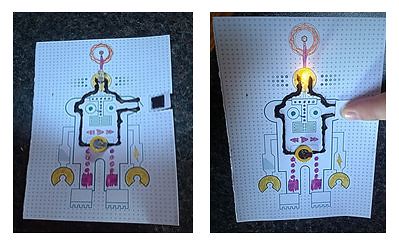
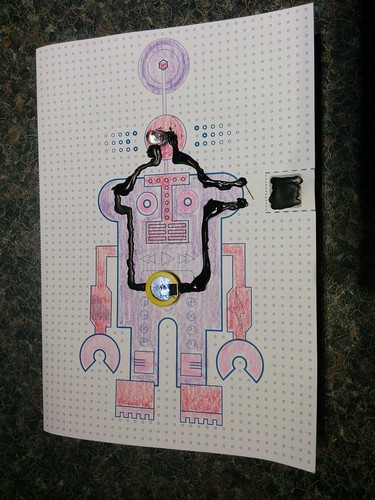
I was preparing to do a session on electricity and circuits, and stumbled across the concept of conductive ink and conductive paint. Initially, I was going to buy a classroom kit from CircuitScribe but it ended up being just a bit too expensive, so I went with this Flashing Robot Parade card kit from Bare Conductive as it was considerably cheaper and made something kid-friendly that they could take home.

IMG_20150516_074931
Meet my robot, Nano

Sure enough, the robots were a hit. It took two tries for me to get it right on my own, and I was a bit stressy about getting it to work with the students, but it was nowhere near as aaargh as I thought it was going to be. I prepared the switches on the circuits beforehand, and punched the holes where things needed to be attached to the card - so all that was left to do was decorate, install the battery and LED bulb, and then use the conductive paint to connect them, making a circuit. The group did the lemon battery experiment beforehand, so they'd seen and felt firsthand how a circuit worked, and could explain to me what was in the robot's circuit that was different and why it would work better (stronger power source, and a smaller bulb). We had a small army of robots ready to go home at the end of the session, and I still have heaps of paint left over.

Robots
A Nano robot in action

My only criticism is that the paint took longer than the quoted 15 minutes to dry. On a product recommended for six year olds, this is a bit of an issue, in my mind. My group are pretty good at being patient, but when you're six, you don't really have an endless supply of calm when you're waiting for a robot to play with. The best result I got while experimenting was leaving it overnight to dry, and then closing the circuit with the switch to test it out, and I explained that to the group from the beginning, which helped. I also made the recommendation to the parents when they came to pick their children up, so we'll see what the feedback is like when I see them again in a few weeks.

Totes electrifying. Bare Conductive have other cool cards, too, that come in smaller (read: less expensive) kits - I'd definitely recommend checking them out for holiday fun/birthday parties/an add-on to school electronics programs. I'm tempted to purchase a few for myself, too!

Sunday, 17 May 2015

Virtual Robotics Labs

We had our annual robotics program at school this week, but I had a few students who did not elect to participate, so we ran our own robotics program in the classroom. I found two websites featuring virtual robotics labs they could use to learn to build and program, and most of them finished at least the first one, with two getting almost to the end of the second one.

The first is the Wonderville Robot Lab which introduces components robots are made of (gears, levers, wheels, etc.), and sends children on a little mission to help Crash finish his chores so he can go to the movies with the professor. Unfortunately, Crash is destined to be washing dishes forever, as the program glitches as you try to give the dishwashing robot something to move with. It's definitely designed for younger children - some of mine got quite bored with it easily, while others really enjoyed the cartoon interface and were sad they couldn't do more with it.


Wonderville Lab, Crash, and the robot building lab

The second simulation we used was the Mind Project Virtual Robotics Lab, where students learn to build a real robot (IRIS) using a blueprint and click-and-drag components, and then learn basic programming to make the robot move and perform simple tasks, like picking up a can and putting it in the recycling. This is far more advanced, and only three of us stayed the course for the time we had. It's probably better suited to upper primary students, or gifted students from middle primary.


Screen grabs of building IRIS and the robotic arm, and programming wheel motion.

Why do I see robotics as important? Eighteen years ago, I taught myself html and had a look at Java, and began making websites on the now-defunct Geocities hosting service. I had no idea back then that the internet would expand to the point it has, and that there would be jobs that existed now that hadn't even been dreamed up when I was 11. In eighteen more years, it's quite likely that even more of our manufacturing and manual labour jobs will be done by machines, but while that shuts down many jobs that have been in existence for humans since the dawn of the industrial revolution, it opens up the doors for careers in programming and building robots and components that have barely begun to be dreamed of now. Agrarian, to industrial, to virtual - the world in which the generation I teach will work is is vastly different to that which we prepared to work in at their age.

This video sums it up pretty well.